


FakeGit Returns With 17,610 Malicious GitHub Repositories Distributing SmartLoader Malware
The FakeGit campaign has returned with more than 17,000 malicious GitHub repositories designed to distribute SmartLoader malware, which can be used to deliver additional malware, including the StealC information stealer.
Although the operators primarily use disposable accounts, researchers identified at least 700 accounts that appear to belong to legitimate developers.
The malicious repositories contain convincing README instructions and a download button that links to a ZIP archive containing the initial SmartLoader payload.
Similar activity involving different malware payloads has been observed since at least January. However, researchers first associated the name FakeGit with the campaign in July, when Island published a report on 7,600 fake GitHub repositories distributing SmartLoader.
Island reported that 800 of those malicious repositories masqueraded as AI skills or Model Context Protocol (MCP) servers listed in public AI registries and catalogs.
FakeGit became active again on October 4. According to a new report from software supply chain security company Apiiro, the campaign is currently using 17,610 GitHub repositories.
FakeGit added more than 13,000 repositories in just 34 hours, reaching a peak of 2,999 repositories per hour.
“Of the sampled commits, 97% only touched on the README, and 88% specified a ‘download’ button in the ZIP that installed SmartLoader,” Apiiro said.
“No one needed to create a single new repository; the fleet was already there; they just changed their focus,” the researchers added.
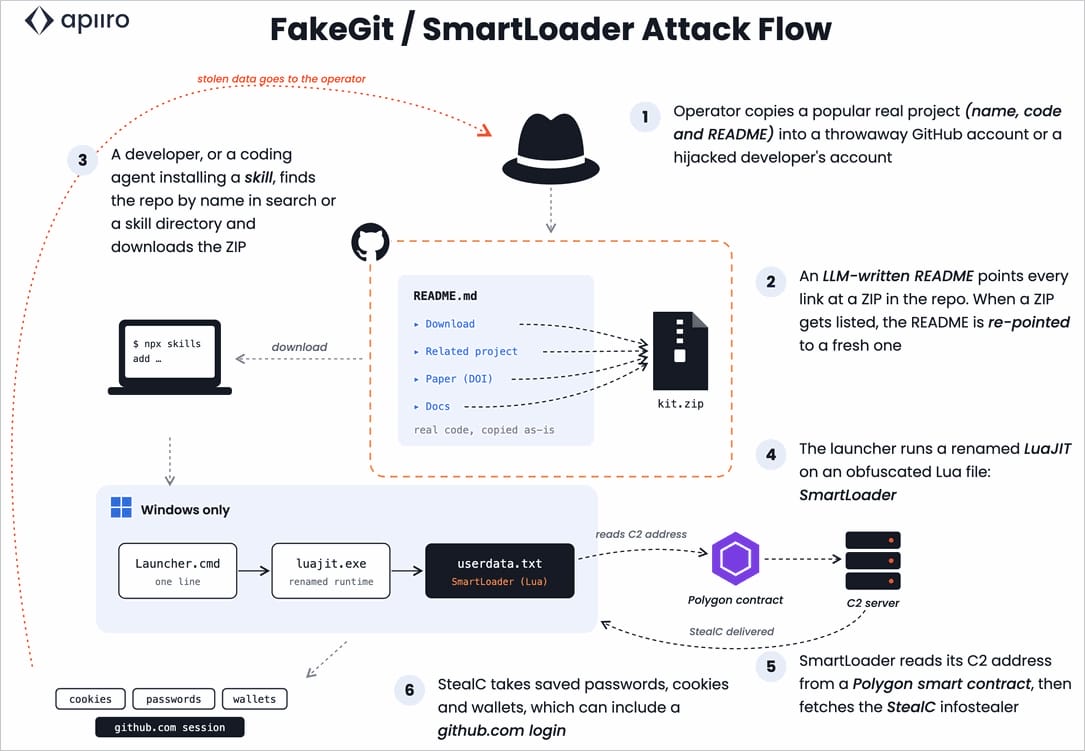
Source: Apiiro
Why the FakeGit campaign continues to survive
According to Apiiro, FakeGit continues to operate because repository deletion relies on a list that covers only a subset of the malicious repositories.
In addition, blocklisted payloads and backup copies remain accessible. This allows attackers to keep the same repository active while changing the download link.
“Prior to our report, 71% of fleets were missing from URLhaus. Domain-level DNS blocklists cannot block a single file on GitHub without blocking GitHub,” Apiiro explains.
Researchers found malicious archives in forks, older files, release assets, problematic attachments, and separate repositories used to host downloads. As a result, removing a single link is not an effective way to disrupt the campaign.
“Deleting a single file allows operators to redirect their bait to spare copies: forks, old ZIPs, release assets, or offending attachments,” the researchers said.
How to protect against fake GitHub repositories
Apiiro recommends verifying a repository’s owner before downloading or installing its contents. AI skills and MCP servers should be installed only from official registries or vendor repositories.
If SmartLoader execution is suspected, users should treat the incident as a possible compromise of their GitHub account. They should revoke active sessions and access tokens, then migrate to passkeys.

Join Mikko Hypponen and security leaders from the NFL, Chanel, and Atlassian for a 2-hour digital summit about what will change with AI speed attacks, what defenders should stop doing, and how to verify, decide, fix, and revalidate at machine speed.
Source: www.bleepingcomputer.com