


For many security teams, the path into a corporate network begins with a phishing email, stolen credentials, or an unpatched vulnerability. However, some threat actors exploit the hiring and employee onboarding process to gain legitimate access from inside the organization.
In July, the U.S. Department of State issued an alert warning that North Korean IT workers may impersonate citizens of other countries to secure remote jobs. After being hired, these workers may send their salaries to organizations operating in North Korea.
The FBI has also warned that fraudulent workers can use their access to copy source-code repositories, steal sensitive data, and support other cybercriminal operations. After being discovered or dismissed, some may attempt to extort their employers by threatening to release stolen code or confidential information.
These incidents expose the gap between verifying a person’s identity and proving who is actually using an employee account or company-issued device. A resume may appear legitimate, and a laptop may be delivered to a domestic address. However, neither control independently confirms that the person interviewed is the person receiving the device or signing in to corporate systems.
For service desk teams, the critical question is how to confirm that an access request comes from a genuine employee rather than an impersonator, proxy, or unauthorized remote operator.
How fake remote workers bypass hiring and onboarding controls
Impersonating another identity: A common tactic associated with North Korean IT worker schemes is falsifying information on online employment platforms. This may involve stolen identification documents, impersonating another person, or using an agent to create and manage an account.
Creating AI-generated professional profiles: Fraudulent workers may establish convincing resumes, professional networking profiles, and social media accounts. Generative AI can help them imitate the tone, language, and communication style of experienced IT professionals.
Using unusual payment arrangements: Fake workers may avoid direct deposits and request payments through intermediaries, money-transfer services, or cryptocurrency. In some cases, third parties receive salary payments on behalf of the worker in exchange for a fee.
Hiding the worker’s true location: VPNs, remote desktop tools, and other technologies can conceal the fact that an individual is working from outside the country listed on their application.
Relying on overseas facilitators: Some operations use local proxies to receive and operate employer-issued equipment. A company laptop may be shipped to an address in the country where the worker claims to live. The facilitator keeps the device powered on and connected while the overseas worker remotely controls it.
Verizon’s Data Breach Investigations Report found that 44.7% of breaches involved stolen credentials.
Protect Active Directory with compliant password policies, block more than 6 billion leaked passwords, strengthen security, and reduce help desk workload.
Why standard employment checks cannot prove who is using a laptop
Background checks, right-to-work verification, and identity checks are designed to confirm that information supplied by a candidate is accurate. However, fake remote worker operations exploit the gaps between these individual controls.
An organization may confirm that an identity exists, that the named individual is eligible to work, and that a laptop was delivered to an approved address. It may then issue credentials to an account that is ultimately controlled by another person.
North Korean IT worker schemes are designed to satisfy common hiring and onboarding requirements, including:
- Stolen or agent-provided documents satisfy identity requirements.
- A fabricated resume passes the recruiter’s initial screening.
- A proxy or skilled representative participates in the interview process.
- A facilitator’s address meets equipment delivery requirements.
- Laptop farms create the appearance of expected locations and device activity.
- Third-party payment accounts satisfy payroll requirements.
Red flags that may indicate a fake remote worker
No single warning sign proves that an applicant is involved in a fake worker operation. However, organizations should investigate the following indicators, which have been highlighted by the U.S. Department of State:
- Registration or account information changes frequently.
- The account owner’s name does not match the name on the registered payment account.
- Multiple accounts were created using the same identification document.
- Several accounts are accessed from the same IP address, or one account is accessed from multiple IP addresses within a short period.
- Login sessions remain active for unusually long periods.
How to protect remote employee onboarding from identity fraud
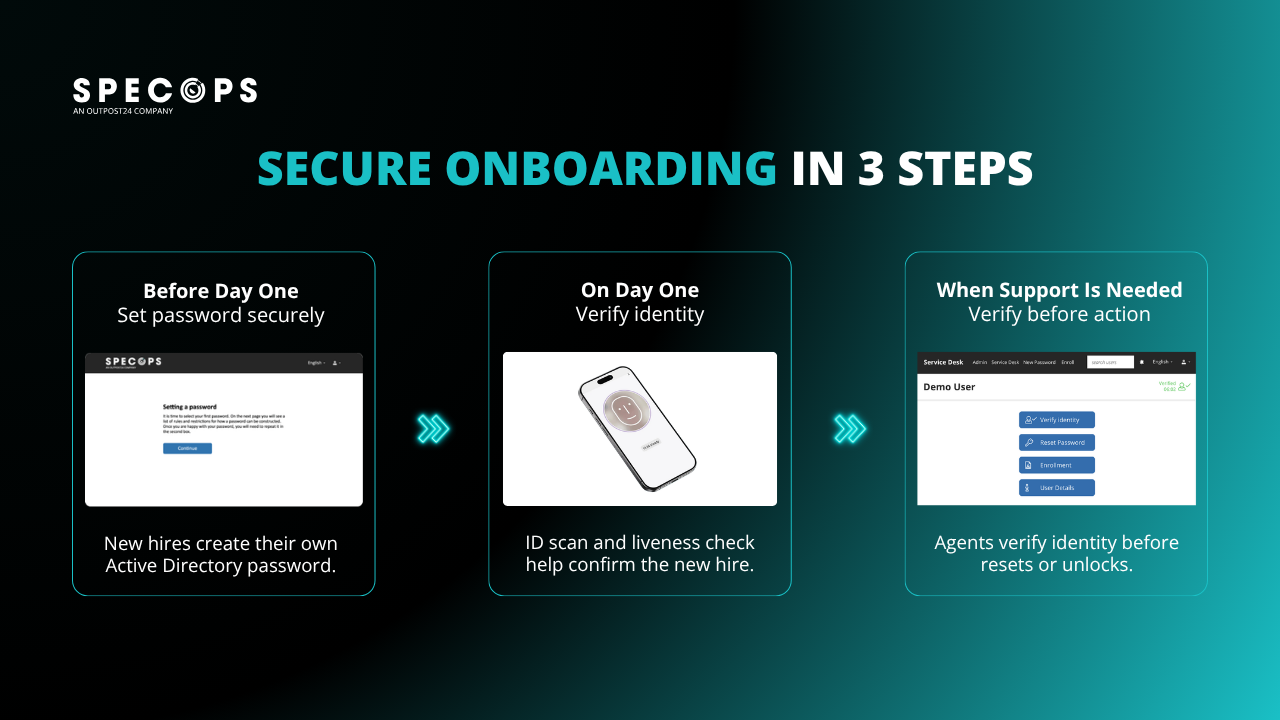
Organizations need strong identity verification and onboarding procedures for remote employees, contractors, and freelancers. Solutions such as Specops Secure Onboarding can add government-issued ID scanning and biometric liveness detection to the onboarding process.
Document verification helps determine whether an identification document is authentic. Biometric checks compare the person completing onboarding with the photograph on the document.
Liveness detection helps confirm that a real person is physically present rather than a photograph, prerecorded video, or manipulated deepfake being displayed to the camera.
Even valid identification documents may be stolen or supplied by a third party. Likewise, a face that appears to match an uploaded image may be presented through a replay attack or deepfake. Combining document verification with biometric liveness provides stronger evidence than relying on either control alone.
Specops Secure Onboarding supports more than 16,000 document types, making it suitable for a wide range of remote and international employment scenarios.
Turn identity verification into access control
The rise of fake remote worker schemes highlights an important security lesson: identity verification should not be treated as a one-time employment record.
Organizations must confirm that the verified person is the individual receiving access. They also need reliable ways to repeat identity verification when access is restored, modified, or requested through the service desk.
Specops Secure Onboarding combines government-issued document verification with biometric liveness detection to create a trusted identity checkpoint during onboarding and when service desk agents receive sensitive access requests.
Contact us today to learn how Specops solutions can help protect your service desk from increasingly sophisticated identity attacks.
Sponsored and written by Specops Software.
Source: www.bleepingcomputer.com