


A new version of the SYS01 infostealer is being distributed through Meta advertisements that promote free animated wallpaper software. The malware can enroll browsers in attacker-controlled enterprise management systems, force-install malicious extensions, steal session cookies, and read or delete messages from Gmail and Outlook accounts.
The campaign targets Windows users with wallpaper applications that appear to work normally while deploying malware in the background. It also focuses on Facebook and Meta business accounts, potentially giving attackers access to advertising pages, payment information, and customer communications.
SYS010 campaign reaches users through Meta ads
Bitdefender Labs is tracking the activity as SYS010 and says it is likely a newer version of the SYS01 infostealer. SYS01 infostealer malvertising activity has been observed on Facebook since at least 2022.
The name reflects researchers’ assessment that the malware is a significant improvement over earlier versions. It is identified as version 2, represented by 010 in binary.
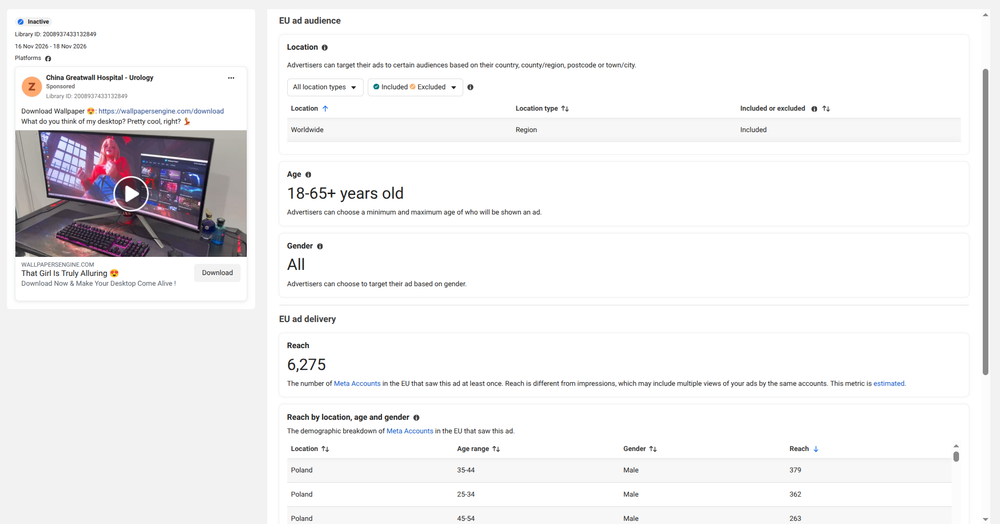
Researchers identified a malicious SYS010 advertisement on October 16 and found that the campaign was still active, with hundreds of ads created. According to Bitdefender telemetry, requests to the attackers’ servers originated in Asia, Europe, North America, Africa, and South America.
Meta’s Ad Library transparency page showed that one advertisement reached 6,275 users in the European Union and targeted people aged 18 and older.
Source: Bitdefender
Bitdefender said most requests came from the Philippines, Thailand, Bangladesh, Poland, Mexico, Algeria, Belgium, Mongolia, and the United States. The company stressed that these figures do not represent the number of confirmed infections.
Malicious wallpaper apps install browser extensions
The advertisements impersonate the legitimate Wallpaper Engine and Lively Wallpapers applications and direct users to malicious download sites. Some of those sites use domains designed to look official.
The downloaded Windows applications provide the advertised animated wallpaper feature, which helps conceal malware operating in the background.
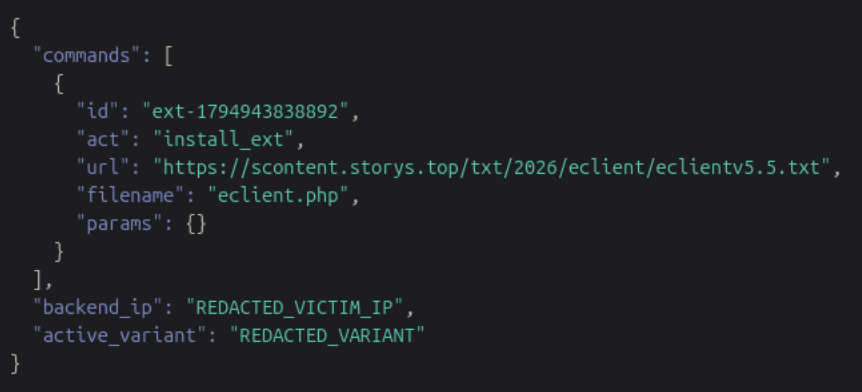
Bitdefender researchers say the attackers abuse administrative tools intended for organizational environments to force Chrome, Edge, and Firefox to install malicious browser add-ons. A script named eclient.php modifies browser management policies to enable the installation.
Source: Bitdefender
Chrome registers the browser with an attacker-controlled Google Admin console, allowing extensions to be installed forcibly. Firefox uses the ExtensionSettings policy to force-install add-ons while disabling developer tools and abuse reporting.
On Edge, the malware may register the victim’s Windows device with an attacker-controlled mobile device management (MDM) server, potentially enabling forced extension installation.
These changes require administrator privileges. To obtain them, the malware repeatedly triggers a User Account Control (UAC) prompt—up to 99 times at three-second intervals—until the user approves the action.
Bitdefender says the resulting browser controls prevent victims from disabling or removing the add-ons. The malicious extension can then steal session cookies, potentially allowing attackers to access signed-in accounts without entering a password or completing a two-factor authentication challenge.
Fake document extensions target business accounts
Bitdefender identified the malicious add-on as a fake document utility named Docs Helper in Chrome and Document Hub in Firefox. The Chrome extension uses an icon resembling the Google Docs logo but is distributed outside the official Chrome Web Store.
The extension also gathers information about Facebook pages, advertisements, and business accounts that victims can access, including advertising spending and payment details.
Gmail and Outlook messages can be read or deleted
Bitdefender’s research found that the Chrome extension can read recent messages in Gmail and Outlook accounts and send their contents to the attackers. It can also permanently delete selected messages.
This capability could allow attackers to intercept login codes and remove security alerts before victims see them, Bitdefender warned. Access to the same inbox could also make it harder for victims to recover compromised accounts.
Similar behavior has recently been observed in another infostealer known as Remus, which also uses malicious extensions to read Gmail messages. Remus takes a different approach to Chrome installation: it registers the add-on directly in the victim’s browser profile and enables developer mode so that an unpacked extension can run.
How to reduce the risk
Although malvertising is often considered relatively low risk, compromised advertising accounts can cause substantial harm. Attackers may use stolen accounts to fund additional campaigns while appearing to operate through trusted companies.
Affected businesses may face fraudulent advertising charges, lose access to social media accounts, and expose conversations with customers.
Bitdefender recommends avoiding software downloads promoted through social media advertisements and rejecting administrator prompts with unclear purposes.
An unexpected “Managed by your organization” message in a browser is another warning sign. People using managed work devices should check with their IT department, while anyone seeing the message on a personal computer should investigate further.
Businesses should review who has access to their Meta accounts, remove unnecessary permissions, and look for unfamiliar advertisements, payment changes, and unusual spending.
Source: www.bleepingcomputer.com