



TrustSink Attack Abuses Microsoft Entra External MFA Providers to Steal Passwords
Security researchers have developed an attack that allows hackers with privileged access to register a rogue external MFA provider and steal users’ passwords during legitimate Microsoft Entra login attempts.
Named TrustSink by Varonis Threat Labs, the attack works against authentication services that rely on external MFA providers. Researchers demonstrated the technique using Microsoft Entra.
How Microsoft Entra external MFA works
Microsoft Entra supports external MFA providers, allowing organizations to use third-party authentication services to satisfy multi-factor authentication requests.
According to Microsoft, once a user signs in with a first factor, such as a password, Entra can redirect the user to an external MFA provider to complete the required second factor.
If the provider returns a valid signed token indicating that the second factor has been completed, Entra considers the MFA requirement satisfied.
Varonis discovered that an attacker who has already compromised a highly privileged Entra account can register a rogue External Authentication Method (EAM) as an external MFA provider. The attacker can then inject a convincing Microsoft password prompt into a legitimate authentication flow.
The fake prompt captures the user’s password in clear text and allows the malicious provider to complete the login without displaying an error. The provider then returns a valid signed token to Entra.
Varonis explains: “In our test tenant, all sign-ins completed successfully while the server received a password that included a timestamp and source IP address.”
“Resetting the captured password did not remove the rogue provider. The rogue provider remained in the authentication flow and an alternate password was captured on the user’s next sign-in.”
TrustSink is not an initial-access attack. It requires the attacker to already control a highly privileged Microsoft Entra account.
How the TrustSink password-stealing attack works
TrustSink exploits the trust Microsoft Entra places in configured external MFA providers.
Varonis created a malicious provider that appeared to Entra as a legitimate external MFA provider but displayed a copy of Microsoft’s password page to users.
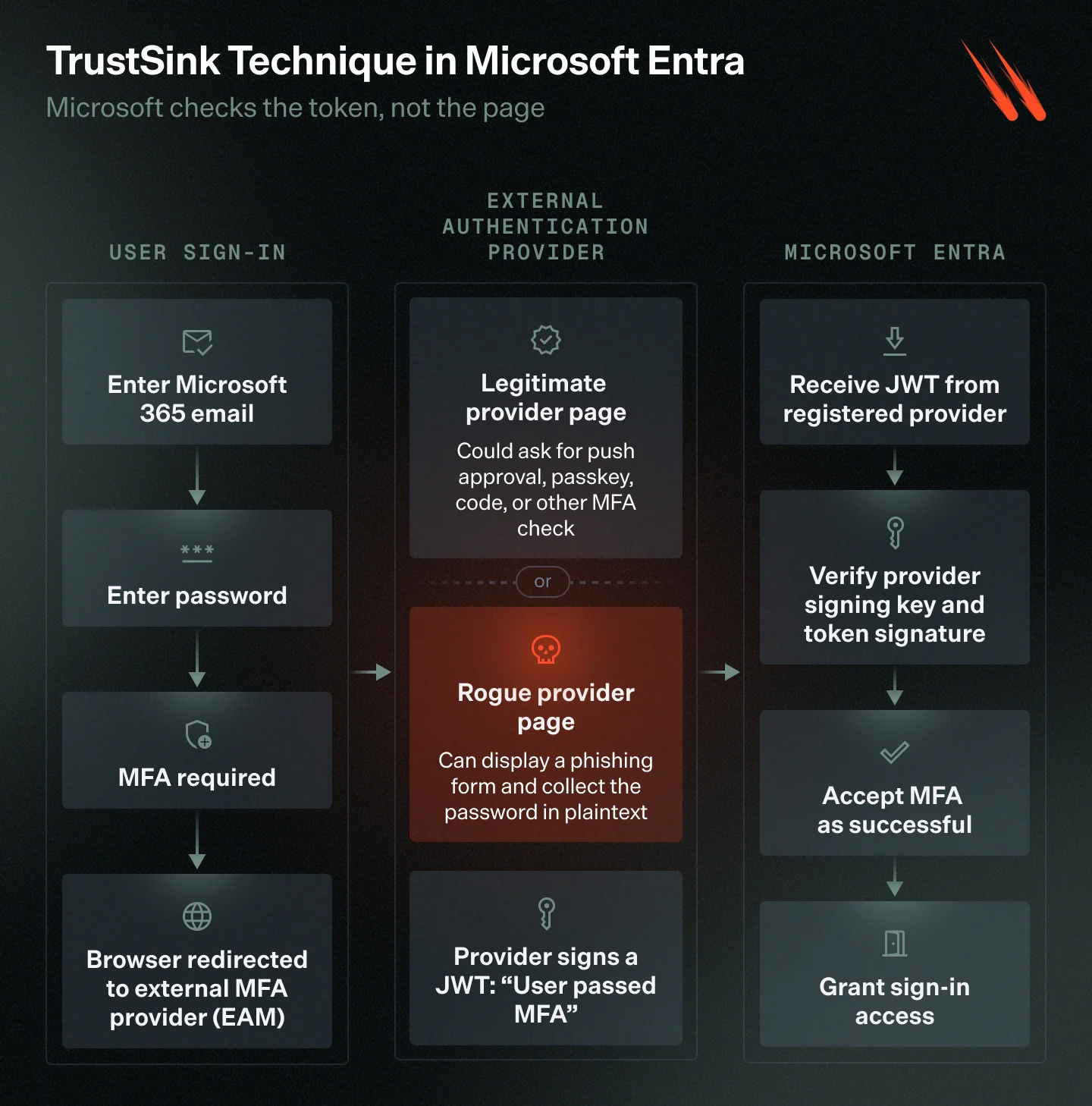
In the proof-of-concept attack, the user begins the login process normally by entering an email address and password on Microsoft’s legitimate login.microsoftonline.com site.
When MFA is triggered, Entra redirects the browser to the attacker’s external MFA provider for a second authentication step.
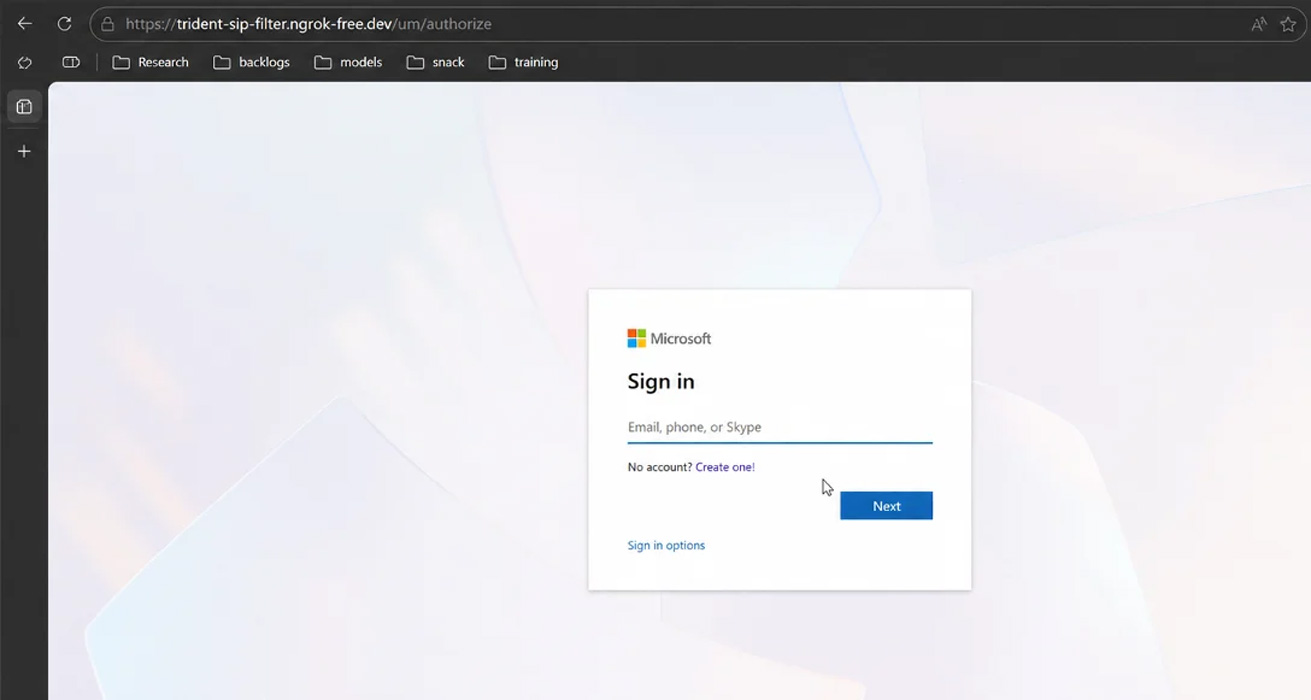
Instead of presenting a legitimate second-factor challenge, the malicious provider displays a copy of Microsoft’s password prompt.
Source: Varonis
If the victim believes Microsoft is requesting the password as part of the authentication process and enters it again, the credentials are sent to an attacker-controlled server.
The rogue provider then generates a signed token and returns it to Entra, indicating that the MFA prompt is complete. The user is allowed to continue to the application they originally tried to access.
From the victim’s perspective, the sign-in appears successful.
Varonis said the attack is convincing because the fake password prompt appears when the user is already expecting another authentication step. The page uses the same font, layout, and button design as Microsoft’s legitimate login page and appears as soon as the victim enters their real password at Microsoft’s domain.
TrustSink builds on earlier Entra research
Varonis said TrustSink is based on previous research by security researcher Dirk-Jan Mollema, presented at x33fcon 2025 in Bring Your Own ID with Entra ID.
Mollema showed how a rogue registered external MFA provider could meet MFA requirements by returning a signed JWT claiming successful authentication without performing the expected authentication checks.
TrustSink uses the same technique for credential theft.
Registering a malicious external method requires changing the authentication method policy and creating an application, service principal, and consent grant.
These actions require a Global Administrator or Authentication Policy Administrator account, making TrustSink a post-compromise attack.
Why changing a password may not stop the attack
Once installed, a rogue provider can remain in the target user’s authentication path for subsequent logins.
The rogue MFA provider remains registered in the tenant’s authentication method policy. As a result, changing a user’s password does not remove the provider, and the password can be captured again during the next login attempt.
Varonis warns administrators to remove malicious providers before rotating affected credentials.
How organizations can defend against TrustSink
Varonis recommends that organizations:
- Remove suspicious external MFA providers and their associated applications, keys, and redirect URIs.
- Reset passwords for affected users after removing the rogue provider.
- Monitor changes to authentication method policies.
- Limit the permanent privileges of Global Administrators and Authentication Policy Administrators.
- Use phishing-resistant authentication methods such as FIDO2 and Windows Hello for Business.

Join Mikko Hypponen and security leaders from the NFL, Chanel, and Atlassian for a 2-hour digital summit about what will change with AI speed attacks, what defenders should stop doing, and how to verify, decide, fix, and revalidate at machine speed.
Source: www.bleepingcomputer.com