



Midnight Mimosa Android Malware Hidden in Firmware Turns Phones Into Ad-Fraud Tools and Residential Proxies
A malware campaign called Midnight Mimosa has been discovered on low-cost Android smartphones with malicious software embedded directly in the firmware. The malware can silently install applications, conduct ad fraud, and turn infected devices into residential proxies.
Researchers believe the malware was introduced somewhere in the device supply chain, although it remains unclear who modified the firmware or when the tampering occurred.
The campaign targets low-cost Android devices using MediaTek chipsets. Because Midnight Mimosa is built into the firmware, it receives system-level privileges that allow it to install and remove applications, grant sensitive permissions, and execute code downloaded remotely without user interaction.
According to Bitdefender researchers, the campaign affected thousands of devices in more than 150 countries over nearly two years. The highest number of victims were identified in Mexico, France, Italy, the United States, Germany, Brazil, and Spain.
Researchers found the malware preinstalled on devices using model names associated with legitimate manufacturers, including the Doogee S200 X and Cubot KINGKONG X. It was also found on phones impersonating Samsung and Apple products.
In an XDA forum post, owners of Cubot and Doogee smartphones reported finding suspicious applications that repeatedly reinstalled themselves after removal.
One Doogee Fire 3 Max owner reported that an official firmware update infected the device. Restoring an older firmware version removed the malware, but installing the update again brought the infection back.
Some users said the manufacturer later released a firmware update that resolved the infection. However, the manufacturer has not officially explained how the malicious software entered the affected firmware.
Bitdefender also referenced an XDA forum post that identified the malware package com.android.non.szcz as part of the same malware family.
How Midnight Mimosa Android malware works
Unlike common Android malware that tricks users into installing malicious applications, Midnight Mimosa is already installed on the device’s system partition when the customer receives the phone.
The malicious programs impersonate legitimate Android system packages with names such as:
com.android.system.litecom.android.sys.protcom.android.sys.gmsprot
These applications are signed and run with elevated system privileges, meaning they cannot be removed through Android’s standard application-uninstall process.
Bitdefender discovered the campaign after its application anomaly-detection technology flagged a suspicious system application named com.android.system.lite. The application was silently installing and removing other apps.
Further investigation showed that the application was part of a broader malware framework that downloads additional modules from command-and-control (C2) servers to perform different malicious activities.
Researchers identified approximately 32 applications distributed through the framework. The apps posed as weather utilities, file managers, app lockers, OCR tools, and audio editors.
Malware generates fraudulent ad impressions and clicks
“System apps themselves do not record fraudulent impressions or clicks,” Bitdefender explains.
“The revenue engine is powered by dropped cover apps such as realistic-looking weather, app lock, notes, and OCR apps that load real ads through legitimate ad SDKs. The goal is simple: load a hidden window on top of the app that registers the ads being displayed.”
These applications generate fraudulent ad impressions and clicks. Some display advertisements in hidden windows or automatically interact with ads without the device owner’s knowledge or involvement.
The malware also uses techniques designed to bypass Android security protections. For example, it can temporarily disable the Google Play Store app, com.android.vending, before silently installing a malicious application. According to Bitdefender, this is intended to prevent Google Play Protect from detecting the installation.
After the malicious application is installed, the malware re-enables the Play Store to avoid raising suspicion.
Some variants also manipulate Android’s recorded installer information, making a malicious application appear to have been installed through Google Play even when it was deployed directly by the malware.
Infected phones can become residential proxies
Midnight Mimosa can also turn an infected Android smartphone into a residential proxy capable of relaying network traffic.
Bitdefender identified a malicious application posing as an app locker, com.mobile.applock.en, that includes a TCP proxy component. The component registers infected devices with a remote command server.
After registration, the malware can receive instructions to connect to specified hosts and route traffic through the infected device.
This could allow attackers to send malicious traffic through the phone owner’s Internet connection, conceal the true origin of an attack, or access devices reachable from the infected phone.
Bitdefender confirmed that the proxy command-and-control infrastructure is operational and accepting device registrations. However, during testing, newly registered devices did not receive relay targets, so researchers could not confirm whether attackers were actively forwarding traffic.
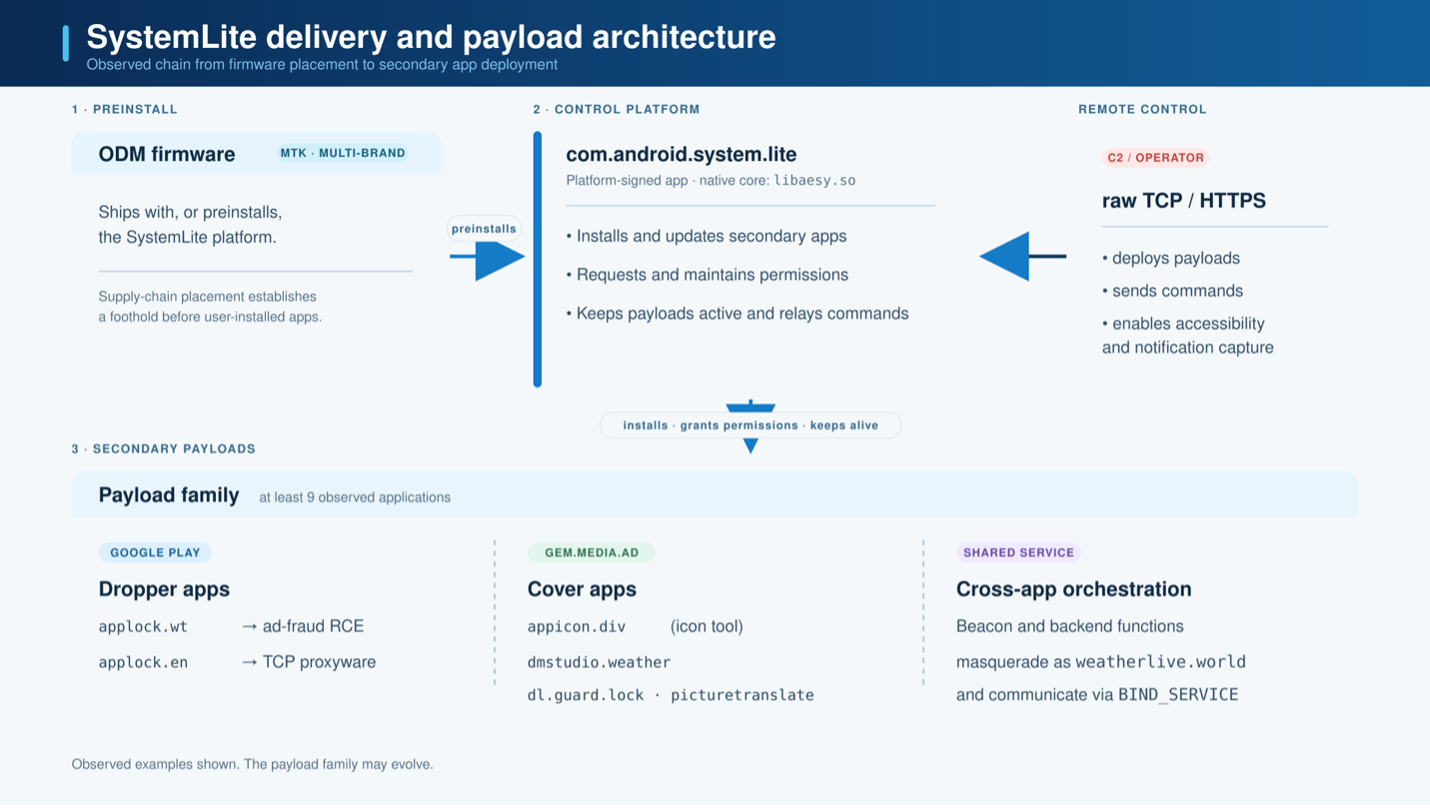
Source: Bitdefender
Android apps linked to the Midnight Mimosa infrastructure
Researchers also discovered 13 Android applications distributed through the Google Play Store that contained the same ad-fraud code and communicated with known Midnight Mimosa infrastructure.
Unlike the preinstalled system components, these applications do not have the elevated privileges required to silently install other software. However, they can display advertisements outside the user interface, including when the phone owner is not actively using the device.
The applications were distributed using 13 different signing certificates and at least two developer accounts: fivedev and CPS Developer.
Researchers also found firmware signed with a certificate associated with Chinese device maker Shenzhen Zediel. They said it remains unclear whether the company was involved in the malware campaign.
Removing the preinstalled malware
Because Midnight Mimosa is installed as a highly privileged system application, it can be difficult for affected consumers to remove.
Bitdefender says removing the infection requires firmware-level cleanup or disabling the malicious components using Android Debug Bridge (ADB), a process that can be complicated for many users.

Join Mikko Hypponen and security leaders from the NFL, Chanel, and Atlassian for a 2-hour digital summit about what will change with AI speed attacks, what defenders should stop doing, and how to verify, decide, fix, and revalidate at machine speed.
Source: www.bleepingcomputer.com