


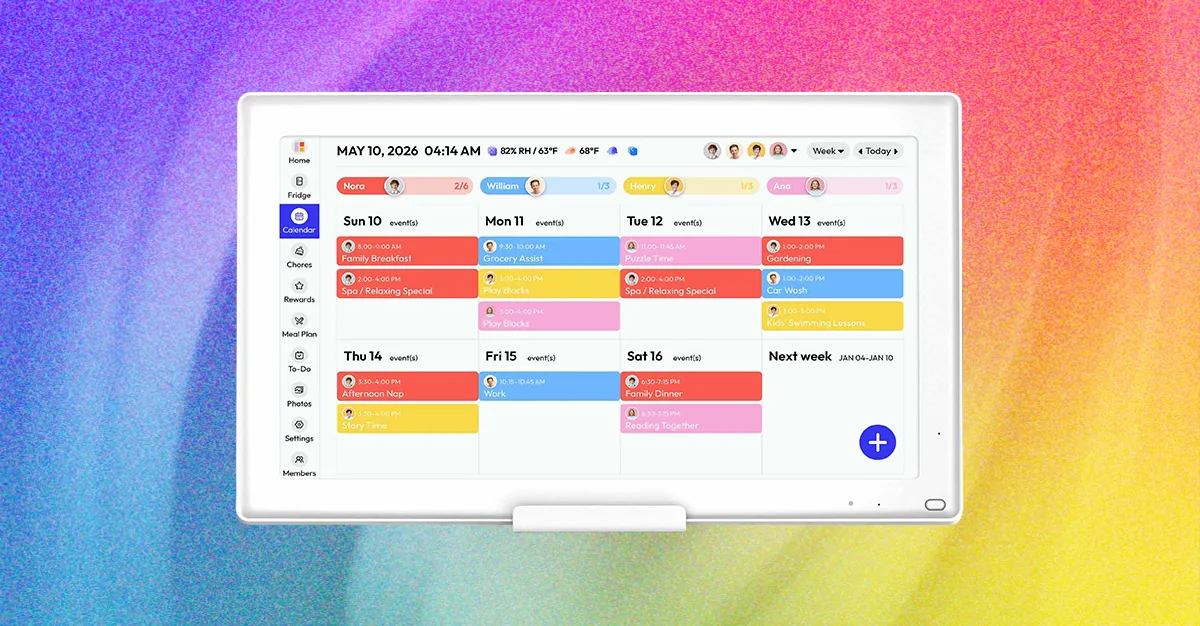
Skylight stands out because of its intuitive software and family-friendly features. Setup is straightforward, and the digital wall calendar quickly imported my Google Calendar along with the other calendars shared through Google. That made it easy to bring my entire family’s schedules together in one place. A navigation menu on the left provides quick access to the main sections, including calendars, lists, tasks, rewards, meals, and recipes. You can also open the Photos, Sleep, and Settings pages from the same menu.
Compared with many other digital wall calendars, Skylight has a cleaner, more intuitive interface. The device feels somewhat like an Android tablet enhanced with dedicated family-organizing tools. You can assign calendars created on the device to individual family members without requiring them to log in or import anything. For example, I assigned my husband’s calendar to him and added another calendar for my son. Shared events also appear only once on the Skylight calendar, while the selected colors are combined to show which family members are involved.
Skylight’s lists and tasks serve different purposes. Lists are useful for groceries and other household reminders, while tasks function as a digital chore chart. Completing tasks sends users to the rewards page, where children can build habits and earn rewards tied to goals you create. This feature is especially helpful for children who are old enough to manage their own schedules. The recipe feature is also convenient: when you add a recipe to Skylight and include it in your weekly meal plan, the device can suggest adding the required ingredients to your shopping list.
The biggest drawback is Skylight’s subscription paywall. Features such as meal planning, exclusive offers, photo screensavers, and the built-in Sidekick AI assistant require a Skylight Plus membership, which costs $79 per year or $8 per month. For me, the subscription is easier to justify because Skylight also doubles as a digital photo frame. Having family photos and a shared household calendar on the same device makes it a useful addition to the home.
Best digital wall calendar without a subscription
The Everblog HomeCal is another family calendar worth considering, particularly if you want to avoid an ongoing subscription. Its operating system is similar to Skylight and has a familiar Android-style interface, but it feels less like a large tablet than the Apolosign and Cozyla calendars discussed below. Initial setup was smooth, although calendar invitations took some time to appear on the device. Updates made in Google Calendar also did not always sync immediately.
During testing, Everblog worked reliably most of the time, but I occasionally noticed missing events. Each calendar connected to the HomeCal also created a separate email account, which was inconvenient. Fortunately, I could disable additional email notifications while using other sections, such as the household chore page, so I did not need to manage multiple profiles. Overall, Everblog HomeCal is a capable digital wall calendar for families who want shared schedules, household organization, and photo-display features without paying for a premium subscription.
Source: www.wired.com