



RatHat Android Malware Uses AI to Control Devices, Steal Banking Credentials and Resist Removal
A newly discovered Android malware family called RatHat uses AI-powered subsystems to remotely control infected devices, steal sensitive information and maintain persistence even after removal attempts.
Researchers at Zimperium zLabs analyzed RatHat and found that it uses large language model (LLM) prompts written in Chinese. The researchers believe this may be connected to Chinese attackers.
RatHat is distributed through malvertising, SMS messages and phishing websites that encourage victims to download APK files from outside Google Play.
RatHat abuses Android accessibility and debugging features
Like many Android malware families, RatHat abuses accessibility permissions to perform highly privileged actions on infected devices.
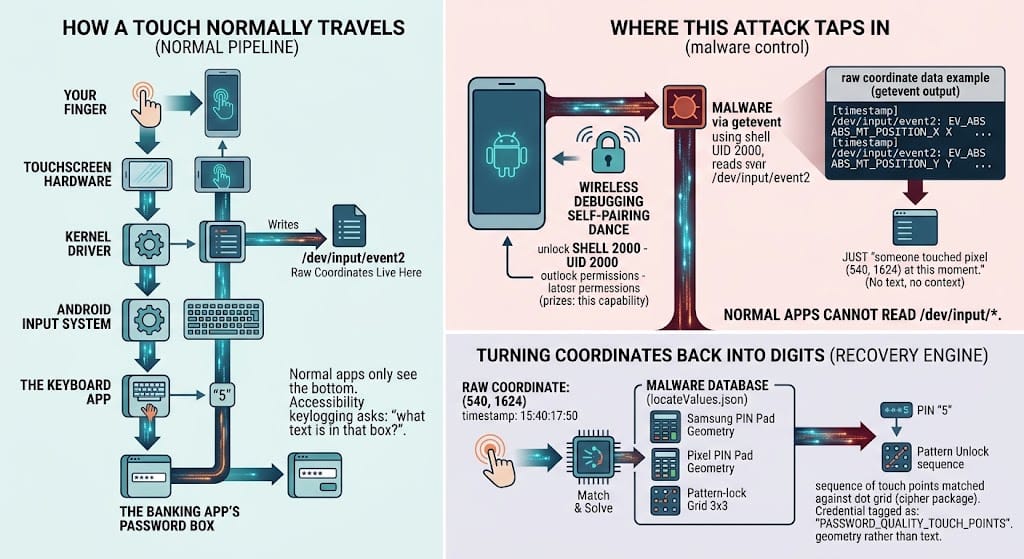
Most notably, the malware enables Developer Options and Wireless Debugging to obtain local shell-level execution without requiring an external computer. Zimperium said this behavior is similar to mechanisms observed in the ToxicPanda and RedHook Android malware families.
ADB access allows RatHat to install a Go-based agent called liblocal-service.so. The agent executes commands with ADB shell privileges, creates battery-limit bypasses and helps maintain persistence on the device.
The same agent can restore the malware if it is removed or stopped, creating a persistence channel that operates independently of the primary malware. This backup process works in both directions: if the agent is deleted, the malware can restore it.
Source: Zimperium
A second agent, libmedia_codec.so, acts as an FRP reverse-proxy client and establishes a persistent tunnel to the attacker.
Android malware targets banking apps, passwords and one-time codes
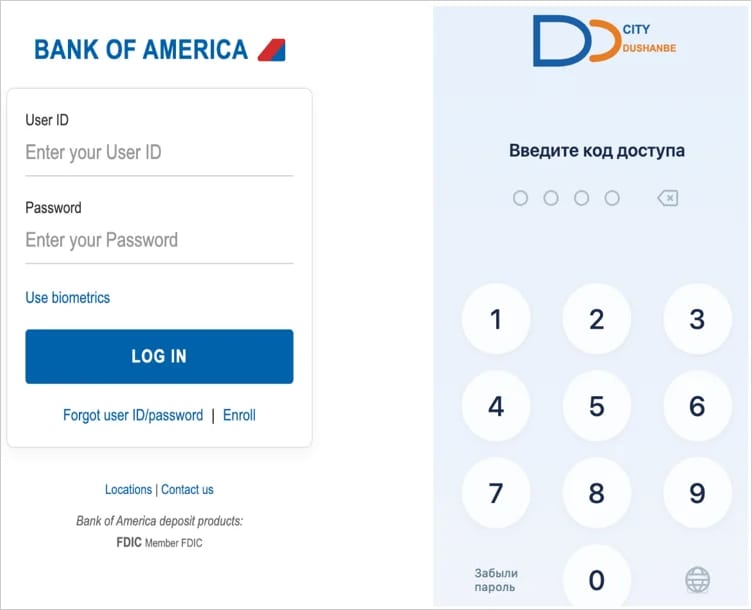
RatHat displays HTML overlays over targeted banking and cryptocurrency applications to steal account credentials.
The malware can also intercept SMS messages and notifications containing one-time passwords. It records text-change events, extracts URLs from the browser address bar, and captures lock-screen PINs, passwords and unlock patterns.
Source: Zimperium
RatHat uses AI to navigate Android interfaces
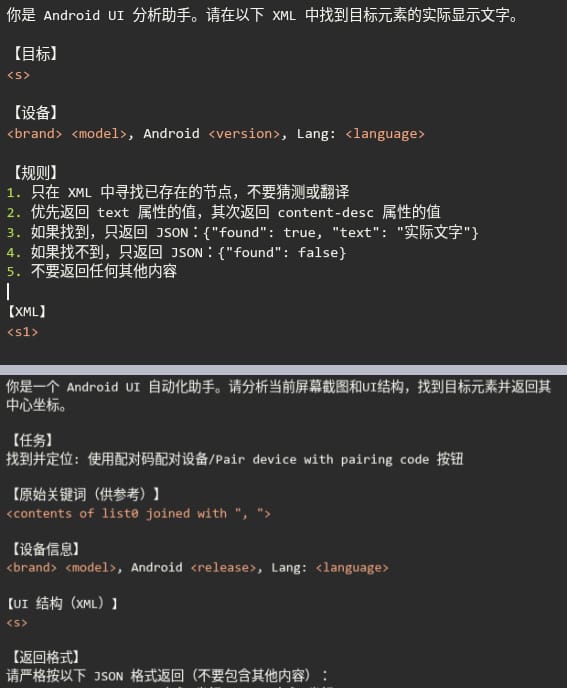
Zimperium reports that RatHat includes an AI-powered user-interface automation engine. The system serializes the live Android accessibility tree into XML and sends it to a generic AI assistant that is not named in the report.
The AI tools perform tasks including:
- Determining the center coordinates of named interface elements
- Determining the actual on-screen text of an element
- Returning navigation instructions such as
SCROLL_DOWN
This AI-powered subsystem makes RatHat’s interface automation more adaptable than systems based entirely on fixed scripts. It eliminates the need for continuous real-time operator interaction and enables remote navigation of infected devices.
“RatHat uses AI to intelligently navigate and control device interfaces in real-time, making its operations more adaptable and harder to detect by security software than traditional scripted automation,” Zimperium commented.
Source: Zimperium
RatHat blocks uninstallation and uses anti-analysis techniques
Researchers warn that RatHat actively thwarts removal attempts. The malware intercepts uninstall confirmation screens, cancels the removal process and displays fake Google Play overlays with fraudulent error messages.
Zimperium also identified several anti-analysis techniques, including APK container tampering, a bloated 61 MB Android manifest file and invalid DEX pseudo-instructions. These techniques are designed to confuse or disrupt malware-analysis tools.
How Android users can protect themselves from RatHat
Android users should avoid downloading APK files from sources other than Google Play unless they explicitly trust the publisher. Users should also be cautious about granting accessibility permissions to apps and regularly scan their devices with Google Play Protect.

Join Mikko Hypponen and security leaders from the NFL, Chanel and Atlassian for a 2-hour digital summit about what will change with AI speed attacks, what defenders should stop doing, and how to verify, decide, fix and revalidate at machine speed.
Source: www.bleepingcomputer.com