


M6 Mac Mini Review: Ports, Design and Performance Improvements
Mac Mini Ports and External Display Support
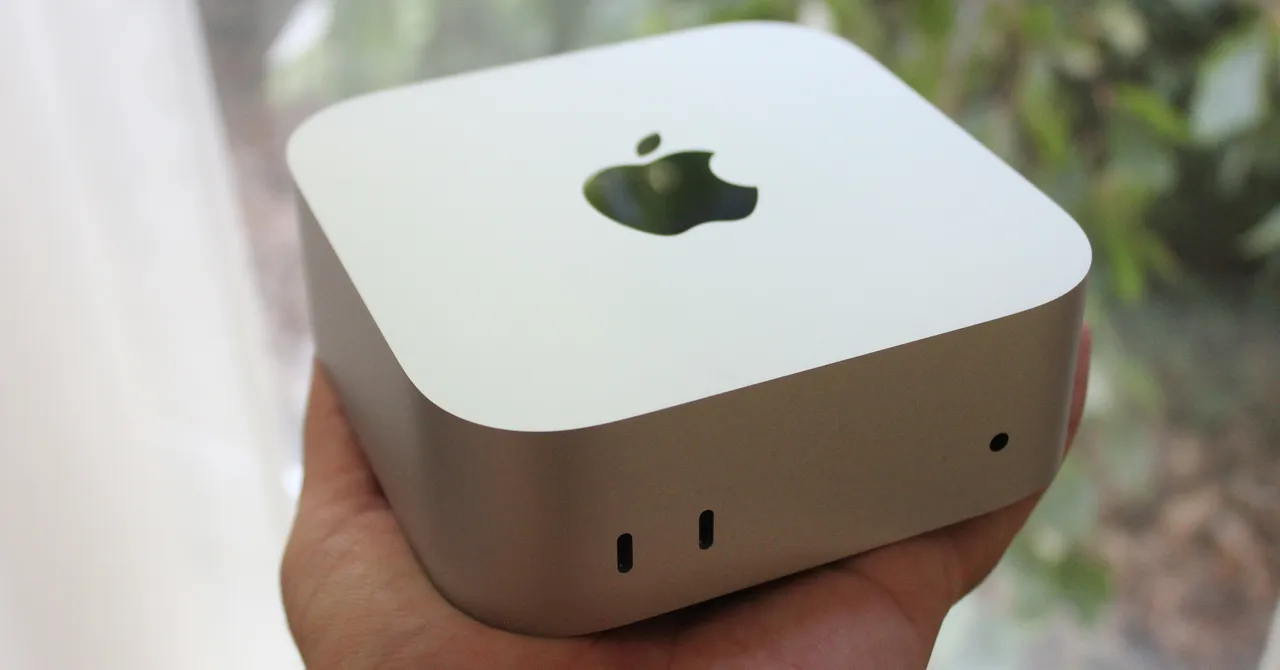
The M6 Mac Mini keeps the same port layout. On the front, it has two USB-C 3 ports with transfer speeds of up to 10 Gb/s, a headphone jack, and a power indicator light.
The rear includes three Thunderbolt 4 ports, an HDMI 2.1 port, an Ethernet jack, and a power adapter port. Using the available USB-C ports and HDMI, the Mac Mini can connect to up to two 5K displays at 120Hz, such as the Studio Display XDR or BenQ 5K MA270S, or up to three 4K displays.
The Mac Mini’s Hidden Power Button
One controversial design choice remains the power button, which is hidden beneath the computer’s rear-left corner. If you know where it is, turning on the Mac Mini is as simple as tilting the computer to one side and reaching a finger around the back.
If you forget the button’s location, however, you may need to flip the entire unit over while all the cables are connected. In my opinion, this is still a poor design decision, although it is not as frustrating as Apple’s Magic Mouse charging setup. The Magic Mouse, sold separately, is still notorious for having its charging port on the bottom. But I digress.
No Built-In SD Card Slot
I still wish the M6 Mac Mini included an SD card slot on the front, as the Mac Studio does. Many photographers and videographers will find the Mac Mini suitable for their needs, but they will need to buy an additional dock or adapter to transfer files from an SD card.
It would also be nice to see more color options, similar to the iMac. From the outside, however, the M6 Mac Mini remains a well-built and compact mini-PC. To understand the value of this latest generation, we need to examine its internal performance.
M6 Mac Mini AI and Chip Performance
I first wanted to test the new components inside the M6 Mac Mini, starting with improvements to the M6 chip itself. The M6 provides the first look at the next generation of Apple Silicon and is the first Apple chip built on a 2nm process node.
The smaller process allows significantly more transistors to fit on the chip. In this case, the M6 has 46 billion transistors, representing an approximately 35% increase in transistor density. In theory, that should improve both efficiency and performance.
The M6 Mac Mini also has two more CPU cores than the M4 model, bringing the total to 12 cores. Apple’s figures indicate a 21% improvement in single-threaded performance and a 36% improvement in multi-threaded performance.
Those numbers sound impressive, but the results are less remarkable compared with the MacBook Air’s M5. In single-threaded performance, the M6 Mac Mini is only about 10% faster than the MacBook Pro’s M5 Pro chip. As expected, it is even slower in multi-threaded performance. The additional CPU cores do improve multi-threaded performance compared with the base M5 chip, although laptop and desktop comparisons are difficult to make directly.
Cooling and Sustained Performance
Like previous Mac Mini models, the M6 version includes an internal fan. When handling demanding workloads, the fan becomes noticeably audible. It is not excessively loud, but users accustomed to a fanless MacBook will definitely hear it.
That active cooling helps the M6 chip deliver more powerful performance than the MacBook Air. However, a direct comparison will not be possible until the M6 MacBook Air launches, which will probably happen in 2027.
Source: www.wired.com