


Critical Ghostscript Vulnerability Enables Remote Code Execution Through Malicious PDFs
A critical heap buffer overflow vulnerability in the Ghostscript interpreter and rendering engine could allow remote code execution when a vulnerable system processes a specially crafted PDF file.
Tracked as CVE-2026-39919, the flaw was discovered on August 23 by researchers from Defiant’s Wordfence platform using Argus, the company’s AI-powered systems.
How the Ghostscript vulnerability works
Ghostscript is a PostScript and PDF interpreter that can optimize PDF files by rendering them as images, generating preview thumbnails, compressing embedded images, and removing unnecessary font data.
When WordPress generates PDF thumbnails, it uses the PHP Imagick extension to call ImageMagick, which can then launch Ghostscript to process the file.
According to Wordfence, specially crafted PDF files containing JPEG 2000 images can trigger incorrect processing of low-bit-depth samples and component-resolution mismatches.
Researchers used Argus to develop two exploits for CVE-2026-39919. The exploits force Ghostscript to write 1,024 bytes into a 256-byte buffer, corrupting nearby memory and potentially enabling unauthenticated remote code execution in a WordPress environment.
Vulnerable Ghostscript versions and tested environments
Although Wordfence’s research focused on WordPress systems, the vulnerability affects online systems running Ghostscript versions 9.21 through 10.07.1. Exploitation depends on tailoring the payload to the target environment.
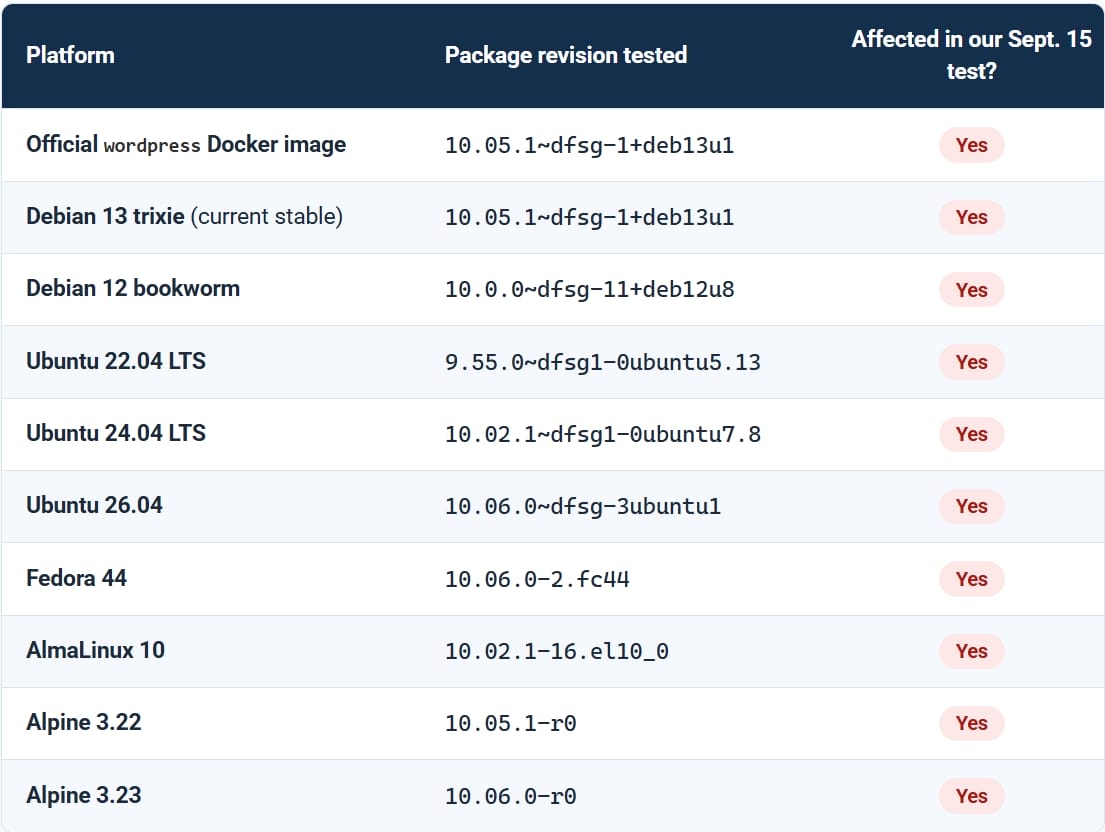
Researchers tested 10 Linux environments, including Debian, Ubuntu, Fedora, Alpine, and AlmaLinux. They also tested official Docker image snapshots of WordPress and found that all contained the vulnerable code.
Source: Wordfence
Exploitation depends on the target environment
Wordfence tested two proof-of-concept exploits and found that their ability to trigger the vulnerability depended on the target environment.
In the researchers’ lab testbed, the exploit was run against Linux packages 10,240 times without successfully executing code remotely. However, the researchers were able to execute code remotely on a dedicated test server.
Changing the PDF’s font, language settings, font configuration, and one core system library could lead to successful exploitation, although success was not guaranteed.
Four conditions required for exploitation in WordPress
In a WordPress environment, Wordfence identified four prerequisites for a successful attack:
- An attacker must be able to upload a PDF anonymously or through a low-privileged account.
- The site must process the PDF and generate a preview or thumbnail.
- The processing chain must reach Ghostscript, with the necessary software and policy settings allowing PDF rendering.
- The vulnerable Ghostscript decoding code must remain unpatched.
Wordfence noted that stock WordPress does not allow anonymous uploads to the media library.
More broadly, any application that renders an attacker-provided PDF using the affected Ghostscript code may be exposed. Authentication requirements for exploitation vary by application.
Ghostscript patch and mitigation guidance
Artifex, the administrator of Ghostscript, released a fix in version 10.08.0 of the interpreter on September 8. The fix was also backported to older versions, so users should review the revision details to confirm patch availability for their installation.
WordPress administrators should ensure that Ghostscript is upgraded to version 10.08.0 or later through their hosting provider.
Organizations using Docker should rebuild and redeploy their containers with an updated and patched base image.
If upgrading is not immediately possible, administrators should block PDF uploads to the server or disable PDF rendering in ImageMagick.
Wordfence stated that no exploitation of CVE-2026-39919 has been observed in the wild.

Join Mikko Hypponen and security leaders from the NFL, Chanel, and Atlassian for a 2-hour digital summit about what will change with AI speed attacks, what defenders should stop doing, and how to verify, decide, fix, and revalidate at machine speed.
Source: www.bleepingcomputer.com