


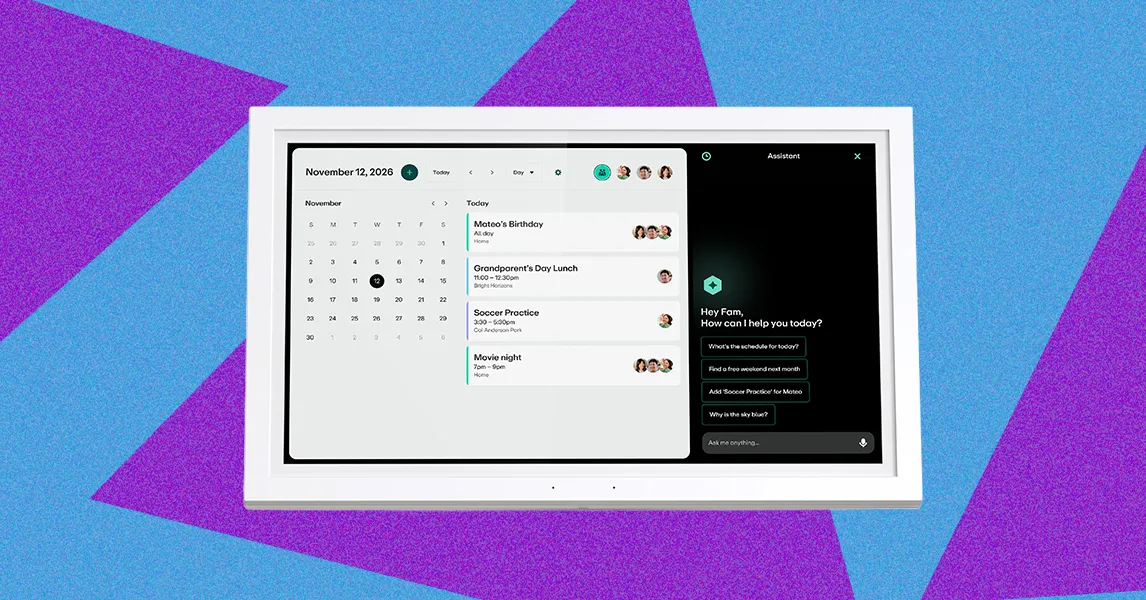
A digital wall calendar can bring Google Calendar, iCalendar, Outlook Calendar and other schedules together on a screen at home, while also supporting meal planning, chore tracking, to-do lists and photo displays. Greenlight’s Family Hub goes further by adding family finance and location features, along with an AI-powered voice assistant available through a $10-per-month membership—an unusual combination in a category that has largely focused on calendars alone.
I set up a digital wall calendar after seeing one at a friend’s house a few months ago. Her first question was one I have often asked myself while testing these devices at home: “Do you have a voice assistant?”
Digital wall calendars are becoming more popular this year, driven in part by the popularity of Skylight calendars. After testing multiple models at home, I understand the appeal. These devices bring the digital calendars many people already use—including Google Calendar, iCalendar and Outlook Calendar—onto a single screen in the home.
That is useful for people like my husband and me, who rely on Google Calendar but do not want to be tied to our phones while discussing plans. These devices can also double as budget-management tools, meal planners, chore trackers and to-do lists. Some display photos as screensavers, functioning as digital photo frames, and Greenlight Family Hub can also be used to manage children’s finances.
Family Hub is an unusual product in the digital-calendar category because of the range of features it offers. Greenlight began as a banking tool for parents and teenagers, so the device adds financial management and family-location tracking to its calendar features. Location tracking uses the Greenlight app on a family member’s phone, while a GPS tracker for younger children can be purchased separately.
But the feature I have wanted most is available through a $10-per-month membership: a voice assistant.
Greenlight’s voice assistant is easy to use and provides smart, thoughtful answers. That raises a broader question: Why do so few digital wall calendars have voice assistants? Conversely, why do smart displays with capable voice assistants not offer features such as full-page calendars and chore charts?
It’s not just a calendar
One feature that distinguishes Greenlight’s hub from other digital calendars is that it uses the calendar as a starting point for services the company already provides. That is why the product is called Family Hub rather than simply a calendar, like many other devices I have tested.
Greenlight has expanded from a banking tool into a platform for managing household chores and children’s money. Family Hub is now designed to bring together family calendars, chores, children’s spending and even family location information.
Greenlight says it noticed that competing products lacked voice support and intentionally built the feature into the hub. “Voice assistants have been around for more than a decade, but when building the Family Hub spec, we realized that voice support was absent in the digital calendar market,” said Sushil Sharma, chief product officer at Greenlight. “Our goal with the Hub was to create an all-in-one command center for busy families to engage with technology in a natural and seamless way. Combining voice assistant functionality with a centralized home display allows families to limit the number of devices they need in their home.”
Voice support may also make the device more accessible to families with young children. Sharma noted that not all children can read and write fluently, while audio support can make the technology easier for children and families to use. After years of smart speakers and smartphones with voice controls, voice interaction is also how many people expect to use devices in the home.
Voice support
Photo: Nena Farrell
Greenlight’s assistant is reminiscent of the modern AI-powered versions of Alexa and Google Assistant because it also uses artificial intelligence. Greenlight says its Family AI Assistant uses Frontier large-scale language models along with the company’s proprietary safety tools, which were designed with family safety in mind.
According to Greenlight, the assistant is designed to avoid sensitive or inappropriate topics—it should not, for example, accidentally tell a child that Santa is not real. It can also set timers and answer everyday questions. Conversations appear on the right side of the display, creating an experience similar to Alexa+ on Echo Show devices.
Source: www.wired.com