


A password spreadsheet may appear to give administrators a complete inventory of company credentials, but it usually reflects only what employees have reported—and only until the document is updated. Passwords changed, created, or shared afterward may be missing, while other work credentials can be stored in browsers, chat messages, personal vaults, shared documents, or even sticky notes. Without a centralized system, businesses can have limited visibility into who uses their credentials, where they are stored, and whether they are weak, reused, or exposed.
Work passwords can end up almost anywhere. An employee may save one in a browser, while teammates send shared logins through chat to keep a project moving. Another employee may put credentials in a personal vault because accessing the company’s approved tools takes too long.
Unless employees report these actions, a spreadsheet will not capture them. As a result, administrators may believe they understand the company’s credential environment when the document actually represents only part of it.
Why company credentials remain hidden from administrators
Convenience is the main reason. When the approval process is slow or unclear, employees tend to use whatever is immediately available: a browser’s built-in password storage, a shared Google Doc, a Slack message, or a note on a desk.
Employees may know these practices violate company policy, but completing the task at hand is often their immediate priority. This makes it extremely difficult to maintain a process that depends on employees manually reporting every new password, update, and shared credential.
If official channels are seen as an obstacle rather than the easiest way to access work tools, employees are more likely to bypass them.
This preference for convenience is also reflected in password habits. According to Verizon’s 2025 Data Breach Investigations Report, an average of only 49% of users’ passwords across services are unique. More than half are therefore reused.
NordPass’ “Top 20 Not-So-Secret Business Passwords” report also found that the most common password used in corporate environments worldwide is 123456. The finding illustrates how often people choose convenience when creating passwords.
Without adequate visibility, a business may not know that one of its most important assets is protected by “123456” or another weak password.
Addressing this problem requires an approach that works for both employees and managers. Without one, credentials remain scattered and difficult to manage, creating security risks and leaving dangerous blind spots.
The risks of limited credential visibility
If administrators cannot see where work credentials are stored, they may not know who is using them, with whom they are being shared, or whether they have changed. They also cannot reliably assess the strength and reuse of the passwords employees use every day.
According to Verizon, only 3% of compromised passwords in its dataset met basic complexity criteria. While this figure does not represent every password in every organization, it demonstrates why teams need a way to identify weak credentials in the systems they manage.
Password reuse creates an additional risk. If one password is compromised and used across multiple services, attackers may be able to access several accounts.
Credentials remain one of the primary ways attackers gain unauthorized access to corporate systems and data. Verizon’s 2026 Data Breach Investigations Report identified credential abuse as the initial access path in 13% of breaches.
The report also found that vulnerability exploitation accounted for 31% of breaches, highlighting the need to protect credentials as part of a broader security strategy.
Storing company credentials in a spreadsheet introduces other risks. After gaining a foothold on a corporate network, ransomware attackers may search specifically for files containing passwords.
Ransomware groups such as Pysa have used automated scripts to scan drives for filenames and folders containing terms such as “password” and “login.”
If attackers find a spreadsheet, they can encrypt it and demand a ransom. They may also use the credentials inside it to access other accounts or systems, potentially allowing the attack to spread further.
A structured approach to managing company credentials
To secure company accounts, administrators need to answer several questions about each credential:
- Is the password strong?
- Who owns it?
- Where is it stored?
- Who has access to it?
- Has it been reused, left unchanged for too long, or exposed in a breach?
Each factor can create risk. A strong password may still be reused across multiple accounts. If it is exposed in a breach, attackers could use it to access other services. Similarly, changing a password does not necessarily confirm that the right people still have access or that former users have been removed.
Reviewing these factors helps administrators identify what needs attention, but tracking everything manually can be difficult.
A business password manager can provide a single place for teams to store and manage work credentials. For example, NordPass Business provides organizations with a centralized vault secured by XChaCha20 encryption and a zero-knowledge architecture. This means the service provider cannot access the information stored inside.
NordPass also helps administrators assess credentials within containers. Its data breach scanner and Password Health tools can help identify weak, reused, old, and exposed passwords.
Administrators can set password requirements to help ensure that employee credentials meet the organization’s standards. Employees can also share credentials through secure channels rather than sending them through ordinary chat messages or documents.
The Shared Hub feature shows who has access to passwords shared by multiple people or teams, while an activity log records actions related to company passwords.
Together, these features give administrators a way to identify credential problems early, prioritize corrective action, and review what has changed. This can help organizations keep corporate logins as secure as possible.
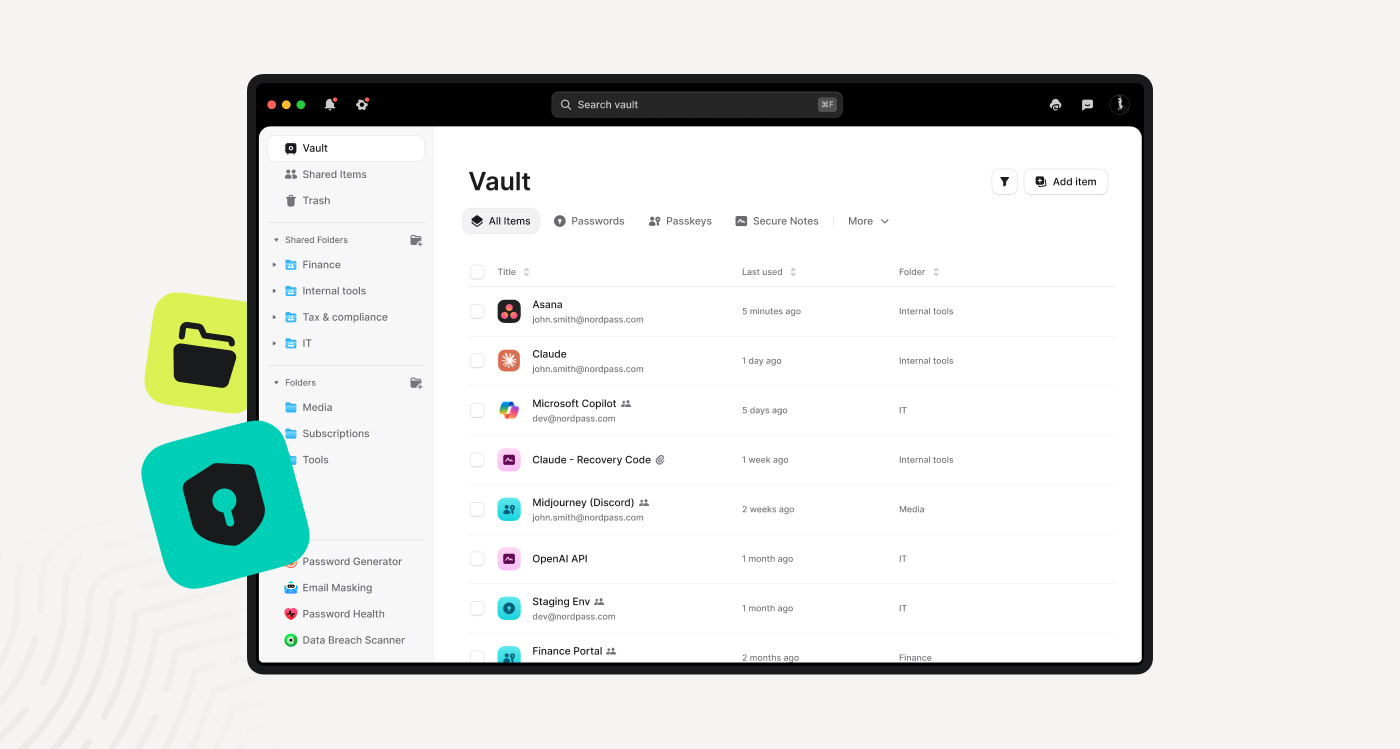
NordPass is designed to help administrators understand where business credentials are stored, when they change, and who has access to them. It also gives employees quick access to the tools they need without encouraging workarounds.
What managed password vaults cannot solve alone
Password managers can address many visibility problems, but they cannot solve every aspect of credential management. Some employees may continue saving passwords in browsers or personal vaults, so adoption depends on making approved options easy to use and setting clear expectations for handling company logins.
Ownership of shared accounts may also need to be clarified. IT teams should determine who is responsible for each login, who requires access, and when that access should be removed.
Not all credentials are passwords. API keys, recovery codes, certificates, and other secrets may require their own storage, access, and ownership rules.
Password health reports should therefore not be treated as a complete inventory of every way employees access company resources.
Stronger credential security starts beyond spreadsheets
Password spreadsheets and other manually updated documents cannot provide a reliable view of a company’s credentials. A secure business password manager such as NordPass Business can provide a centralized place to store work credentials, assess password health, set password requirements, share credentials securely, and track password-related activity.
If you want a clearer view of your company’s credentials, try NordPass and replace spreadsheets with a business password manager built for the job.
Sponsored and written by NordPass Business.
Source: www.bleepingcomputer.com