


Turtle Beach Vulcan II XP Review: Flexible Gaming Features, but Some Rough Edges
The Turtle Beach Vulcan II XP mechanical keyboard offers more than eye-catching design. You can remap inputs to individual keys and save configurations as one of five onboard profiles, making it easy to create layouts for specific games or productivity tasks.
Custom profiles, macros, and game controls
The Vulcan II XP includes a macro manager for creating custom input and command combinations. You can specify how many milliseconds an input must be held before a keypress activates, giving you detailed control over the keyboard’s behavior.
The software supports dozens of popular games by default, including competitive titles such as Counter-Strike and Overwatch, as well as single-player games such as Skyrim. The presets can also be useful for games with active modding communities, where bespoke controls may improve the experience. Profiles for office applications and Photoshop add to the keyboard’s versatility, and new layouts can be imported easily.
Typing experience and switch options
I tested the version with linear switches. Turtle Beach also offers tactile-switch models, with both switch types available in black or white. Linear switches press smoothly throughout the keystroke, while tactile switches provide a slight bump of resistance when the internal switch activates and the keystroke registers. The choice ultimately comes down to personal preference.
For the most part, the Vulcan II XP is enjoyable to type on. The precise spacing between the keys and the satisfying clunk when they bottom out make for a comfortable typing experience. The factory-lubricated linear switches are smooth and quiet until they hit the base, which can make it easy to hold a key down for slightly too long.
That issue is mostly noticeable when pausing mid-sentence, as a letter can repeat unexpectedly. I encountered it a few times while gaming, but became accustomed to the switches over time.
Hot-swappable switches, but no Hall effect technology
Unlike Turtle Beach’s previous Vulcan II TKL Pro, the switches in the Vulcan II XP are not Hall effect switches. However, they are hot-swappable, allowing you to replace or upgrade them without replacing the entire keyboard.
The board supports both 3-pin and 5-pin mechanical switches. Its flat keycaps are also easy to remove, making routine cleaning straightforward. Turtle Beach rates the switches for 50 million keystrokes, which should be sufficient for most users, although that is only one-third of the 150-million-keystroke rating claimed for the Vulcan II TKL Pro.
Gaming performance and advanced remapping
For gaming, the Vulcan II XP offers a 1,000-Hz polling rate and a 1-ms response time. That is competitive-grade performance, although it does not match the 8,000-Hz polling rates available on some high-end gaming keyboards.
The Swarm II software unlocks additional features, including Easy-Shift, which duplicates key functions and places frequently used commands in more accessible locations.
Reactapp assigns two commands to the same key and can be useful in games that require very fast inputs. However, automation features such as this may be prohibited in some competitive gaming environments.
Setting up custom mappings can be tedious, but experimentation makes it possible to create layouts that suit your preferred games and applications. I adjusted many controls in Borderlands 3 and found the changes useful during gameplay. However, while creating a custom setup, undoing one input occasionally reverted the entire profile, forcing me to start over.
Build quality and lighting problems
Photo: Matt Kamen
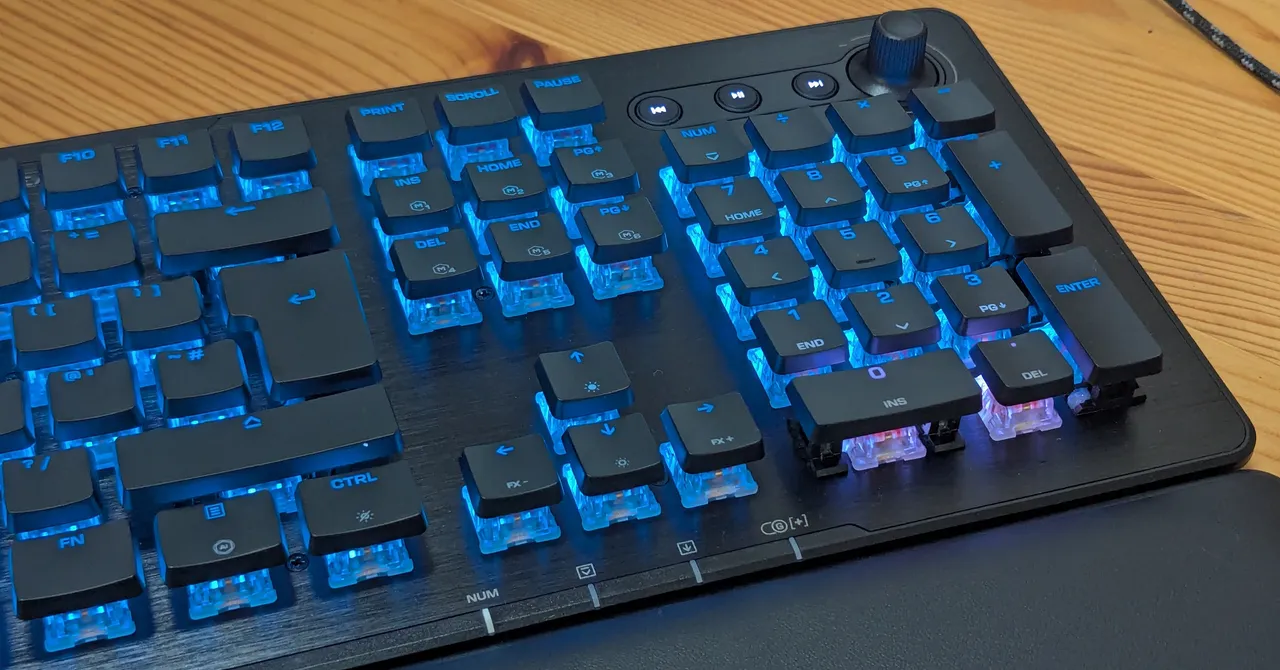
The Vulcan II XP offers strong performance for its price, but my review unit raised concerns about overall build quality. The media wheel was inverted by default: turning it counterclockwise toward the minus sign increased the volume. The problem remained after updating the keyboard’s firmware through the Swarm II app, so I had to remap the controls manually.
The keyboard also had lighting problems around the “0” and “.” keys on the number pad. These keys continued to emit a bright white light regardless of the selected color or lighting pattern. Turning off the lighting on other keys and assigning colors manually did not resolve the issue.
These flaws make the keyboard feel unfinished. The Vulcan II XP looks impressive at first, with a shiny metal top plate over a plastic base, but closer inspection reveals several small annoyances.
Verdict: A good entry-level mechanical gaming keyboard
Despite its shortcomings, the Turtle Beach Vulcan II XP is a reasonable entry point for anyone upgrading to a mechanical keyboard. It delivers an enjoyable typing experience, hot-swappable switches, customizable profiles, and enough advanced gaming features to feel like a genuine upgrade without spending a fortune.
More demanding or professional players may prefer a higher-end keyboard, particularly if they want Hall effect switches, faster polling, or more consistent build quality. For everyone else, the Vulcan II XP offers a stylish and versatile package, provided you can accept its software and lighting quirks.
Source: www.wired.com