


Microsoft has released the optional October 2026 preview cumulative update KB5127936 for Windows 11 versions 25H2 and 26H2. The update includes 41 changes, with improvements to File Explorer, Cloud Rebuild, Windows Recovery, Xbox Mode, backup restoration, privacy settings and battery management.
KB5127936 is a preview update released at the end of the month. It gives IT administrators and users an opportunity to test new features and fixes before Microsoft includes them in the following month’s Patch Tuesday updates.
Unlike regular Patch Tuesday cumulative updates, monthly preview releases are optional and do not contain security patches.
New features in Windows 11 KB5127936
The October 2026 preview update makes it faster and easier to customize the File Explorer context menu. Users can choose which app extensions and commands appear and configure how they work.
Microsoft is also introducing Cloud Rebuild improvements. After installing KB5127936, users can reinstall Windows with images and drivers downloaded directly from Windows Update. The process does not require USB installation media or a custom image, and it can be used even when Windows will not start.
Microsoft has updated Xbox Mode with a redesigned gaming task view. A new navigation bar provides quick access to system actions, including power options and the ability to exit to the desktop while gaming.
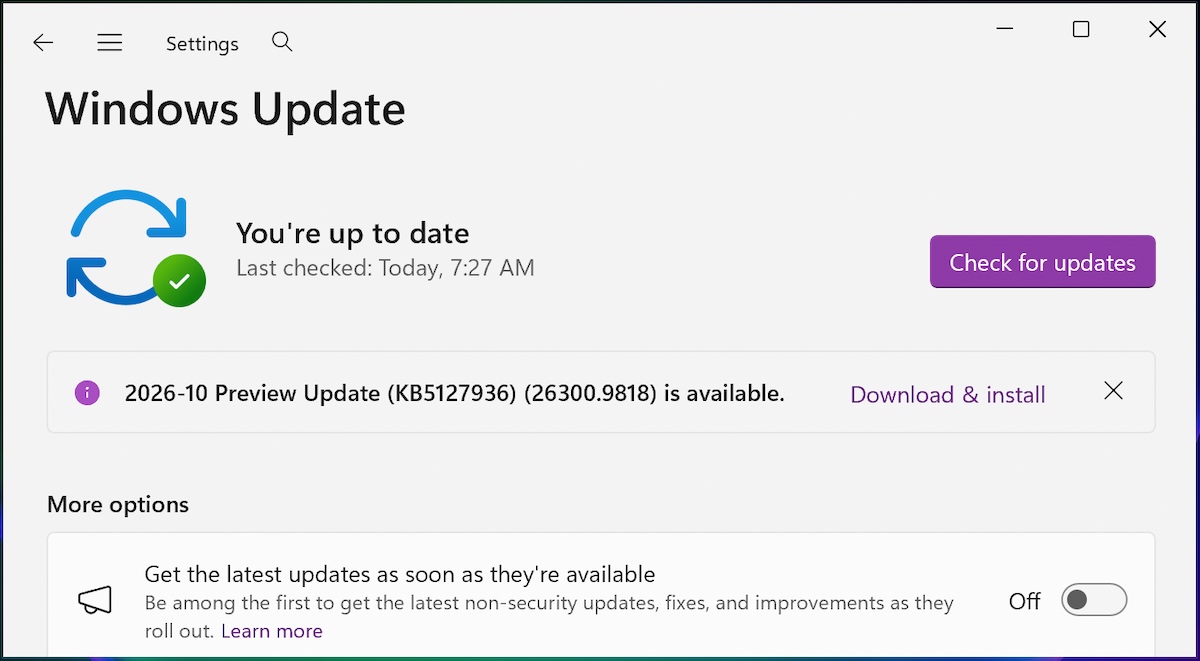
KB5127936 can be downloaded from the Microsoft Update Catalog. Users can also open Settings, select Windows Update, and choose Check for updates.
Because this is an optional update, users may need to select the Get the latest updates as soon as they’re available option and then click the Download and install link.
Highlights of Windows 11 KB5127936
Installing the update upgrades Windows 11 version 25H2 devices to build 26200.9818 and version 26H2 devices to build 26300.9818. Microsoft lists the following additional changes among the update’s key improvements:
- Privacy and security page: Windows Settings now groups camera, microphone and location privacy controls together. Usage information from related pages is also promoted to the main page.
- Wi-Fi profiles in Windows Recovery: Windows Recovery Environment, or WinRE, can automatically reuse eligible Wi-Fi profiles saved in Windows, including supported certificate-based networks. Devices can connect to the internet automatically during recovery scenarios such as Quick Machine Recovery and Cloud Rebuild without requiring Wi-Fi credentials to be configured in WinRE. The feature is enabled by default and can be disabled by an IT administrator. Microsoft unveiled it last month and is now beginning its rollout.
- Backup restore summary: After a backup profile is restored to a new device, Windows displays a summary of what was recovered, including Windows settings and Microsoft Store apps. The summary is intended to make device migration more transparent and help users verify the restore before continuing setup.
- Adaptive hibernation: The adaptive hibernation policy is being adjusted to speed up Modern Standby resume while preserving battery life when the charge is low. Hibernation is reduced when the battery level is above 80% and occurs faster when the level falls below 10%.
Secure Boot certificate update may require another restart
Microsoft also notified users that an updated Secure Boot certificate will be published to replace the original 2011 certificate, which is scheduled to expire in late June 2027.
Microsoft first announced plans in January to renew expired Secure Boot certificates on eligible Windows 11 systems. Its Secure Boot guidance for users and IT administrators addresses the certificate renewal process and references renewal activity beginning in November 2025.
The company also warned that some customers may need to restart their devices again after installing the October 2026 optional update and updates released over the next several months.
“Recent and upcoming Windows updates in the coming months may cause a limited number of consumer and business devices to experience one additional reboot during installation,” Microsoft said in a Message Center update. “This one-time reboot occurs after the Secure Boot certificate update is applied as part of the Secure Boot update process.”
Source: www.bleepingcomputer.com