


Microsoft PowerToys 0.102 Adds Mouse Button Lock, CursorHide and Command Palette Shortcuts
Microsoft has released PowerToys 0.102, adding two new mouse utilities, command-line tools, and improvements to the Command Palette Quick Launcher.
PowerToys Mouse Button Lock makes dragging easier
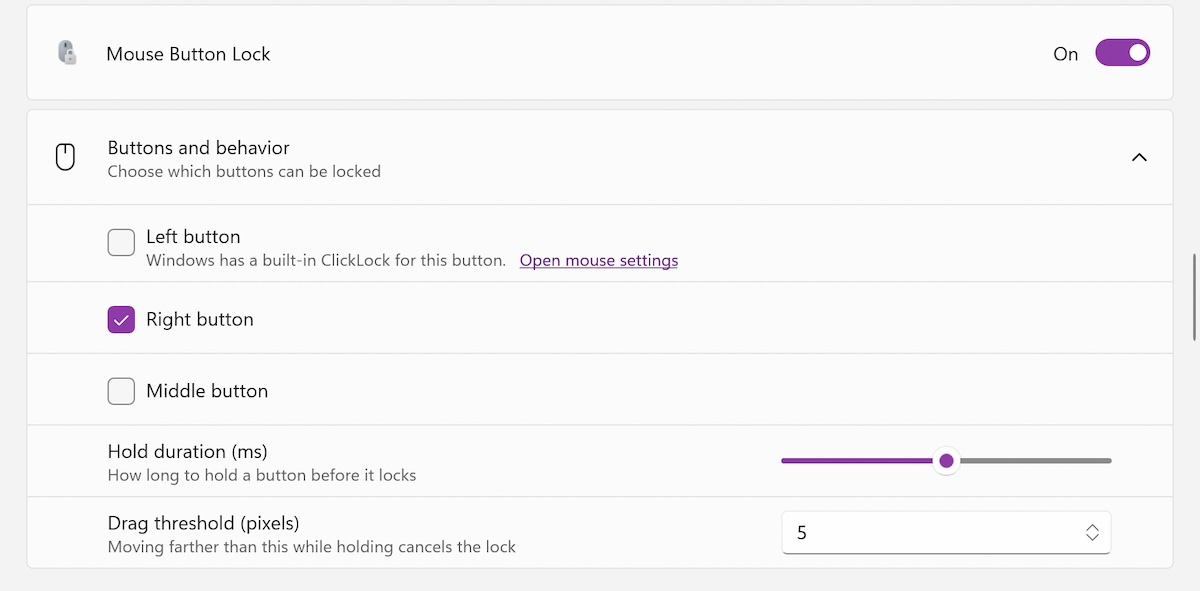
One of the new utilities, Mouse Button Lock, makes it easier to select and drag items on the screen by allowing users to lock a mouse button without holding it down continuously.
To use the feature, press and hold a mouse button briefly, then release it. Windows will continue treating the button as pressed, allowing you to keep dragging or selecting until you click one of the mouse buttons again.
“With Mouse Button Lock, you press and hold a button for a moment, then release it. Windows continues to treat the button as if you held it down, so you can continue dragging or selecting until you click one of the buttons,” said Niels Laute, Microsoft senior product manager, explained.
“This is especially useful when working with games, professional applications that require extensive dragging and selection, and improving accessibility for users who have difficulty holding down a mouse button for long periods of time.”
CursorHide automatically hides the mouse pointer
Microsoft has also added CursorHide to PowerToys. The new mouse utility automatically hides the mouse pointer when you are typing or when the mouse has not moved.
Command Palette adds a Quick Access Shelf
PowerToys 0.102 adds a Quick Access Shelf to the Command Palette Quick Launcher. Users can add up to nine commands below the search box and run them with keyboard shortcuts.
To enable the feature, go to Settings > Appearance > Compact mode. Once enabled, press Alt+1 through Alt+9 to run a command. You can also press Alt+Shift+Number to select a command without running it.
Other PowerToys 0.102 improvements
Additional changes in PowerToys 0.102 include:
- A new command-line tool for scripting PowerToys from the Terminal.
- A tap-alone remap option in Keyboard Manager.
- A searchable key picker.
- A new ZoomIt feature that adds text to screenshots using dictation.
How to download PowerToys 0.102
PowerToys 0.102 is now available from the official GitHub repository, which also provides detailed information about the changes included in each version.
Recent PowerToys updates
Microsoft released PowerToys 0.97 in January, adding CursorWrap. This mouse utility is designed for multi-monitor setups and “teleports” the mouse pointer to the opposite edge of the active monitor, making it easier to drag the cursor across large distances on the screen.
More recently, in August, PowerToys added Window Hopper, a tool that allows users to switch between app windows more quickly.
Microsoft PowerToys was originally released during the Windows 95 era as a collection of small freeware tools created by Windows developers as personal projects.
Microsoft brought PowerToys back in 2019 as an open-source utility pack that enhances Windows functionality and streamlines tasks that previously required installing third-party tools.

The overall prevention score can hide what happens after the initial access. If an attacker uses valid credentials, your defenses drop sharply.
The Blue Report 2026 measures defense techniques by technology across 338 million simulations run in customer production environments.
Source: www.bleepingcomputer.com