



Microsoft Makes WSL Containers Generally Available on Windows
Microsoft has made WSL Containers generally available, expanding the Windows Subsystem for Linux (WSL) beyond running Linux distributions to include building, running, and deploying Linux containers directly on Windows.
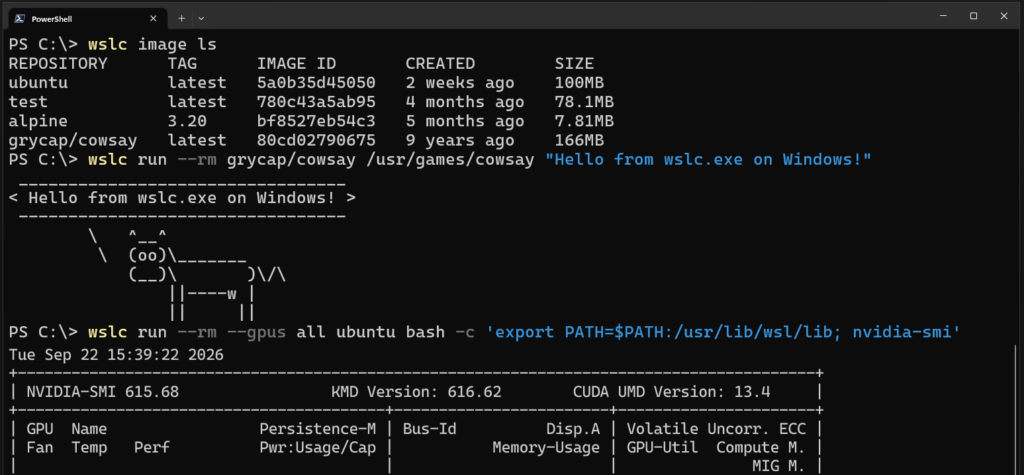
To install the new functionality, run wsl --update. The update adds the wslc.exe command-line tool for managing containers.
Microsoft also includes container.exe as an alias, allowing developers to use more familiar container commands.
“WSL Container CLI: wslc.exe builds, runs, and deploys Linux containers directly on Windows. With built-in aliases for container.exe, you can run the same familiar container commands,” Microsoft explained.
The release also includes a WSL Containers API. Windows applications can use the API to programmatically start and interact with Linux containers.
“Accessing the ability to programmatically run Linux containers in native Windows apps enables scenarios such as running local AI workloads or using cloud-based containerized applications locally,” Microsoft said.
The general availability release adds several features that were missing during the preview, including:
- Restarting containers
- Copying files into and out of containers
- Health checks
- Network connect and disconnect commands
- Real-time container events
- Mount support
- Configurable storage locations
WSL Containers add enterprise security and management features
WSL Containers now integrates with Microsoft Defender for Endpoint. Security teams can view processes, files, and network activity inside containers and correlate that activity with Windows hosts.
Microsoft Intune also allows organizations to disable WSL Containers completely or restrict developers to images hosted in approved container registries.
“Container registry allowlists allow administrators to define approved registries and ensure that developers only retrieve container images from that list that meet the organization’s security and compliance requirements,” Microsoft said.
WSL Containers support VS Code, Aspire, and more
Microsoft is also working with the broader developer ecosystem. In VS Code development containers, wslc is used as the default driver. Aspire and the VS Code Containers extension now support WSL Containers as well.
wsl compose up support is coming
Docker Compose-style support remains one of the most requested missing features. Microsoft says it is already working on a solution.
“Our goal is to make wsl compose up work with existing compose.yaml files without modification,” Microsoft said. “We are getting started on this and hope to share more soon.”
Microsoft is also improving WSL’s underlying network and OS file performance.
The company says WSL Containers can already deliver up to twice the performance when accessing Windows files from Linux environments.

Join Mikko Hypponen and security leaders from the NFL, Chanel, and Atlassian for a 2-hour digital summit about what will change with AI speed attacks, what defenders should stop doing, and how to verify, decide, correct, and revalidate at machine speed.
Source: www.bleepingcomputer.com